Dreamcatcher

An in-development cooperative game with production audio, networked voice systems, and sound-reactive mechanics built in Unreal Engine 5.

2025 - Present Game Audio In Development

Tech Stack

  • Unreal Engine 5.6
  • C++
  • Wwise
  • RNNoise
  • Perforce

My Role

  • Audio Lead
  • Technical Audio
  • Audio Engineering
  • Sound Design & Implementation

Technical Focus

  • Realtime Voice
  • Interactive Audio
  • Acoustic Systems
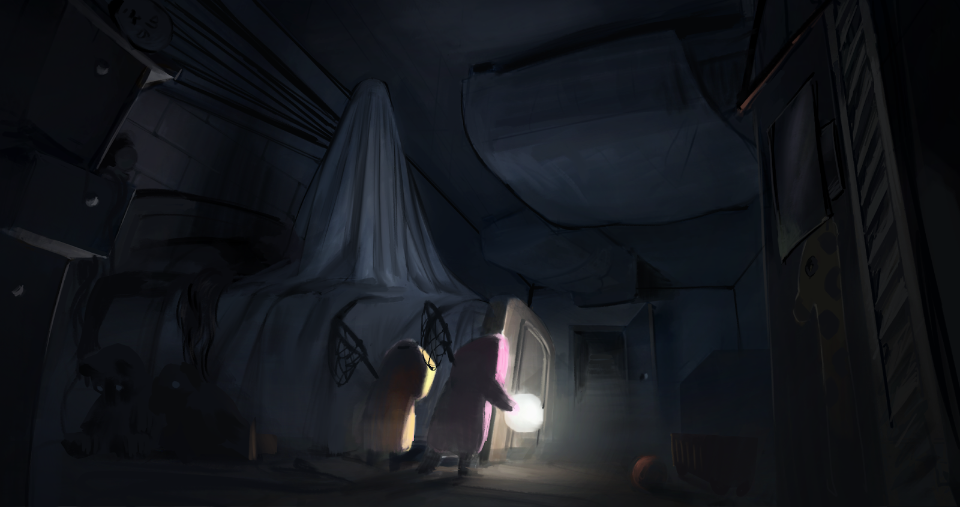
Dreamcatcher gameplay scene showing two small characters illuminating a dark bedroom
Dreamcatcher

Overview

Dreamcatcher is an ongoing game project where sound is both presentation and gameplay infrastructure. As Audio Lead, I own the audio production pipeline, Wwise implementation, realtime voice processing, sound-reactive mechanics, and the engineering work that connects microphone input to the game world.

During preproduction I synthesized 10 sound effects, organized the evolving asset workflow, and built Wwise structures for character, object, monster, UI, voice-chat, reverb, and spatial-audio content. The live production tracker now covers 25 named SFX cues. This page focuses on the technical systems I designed and implemented in C++.

Realtime Proximity Voice

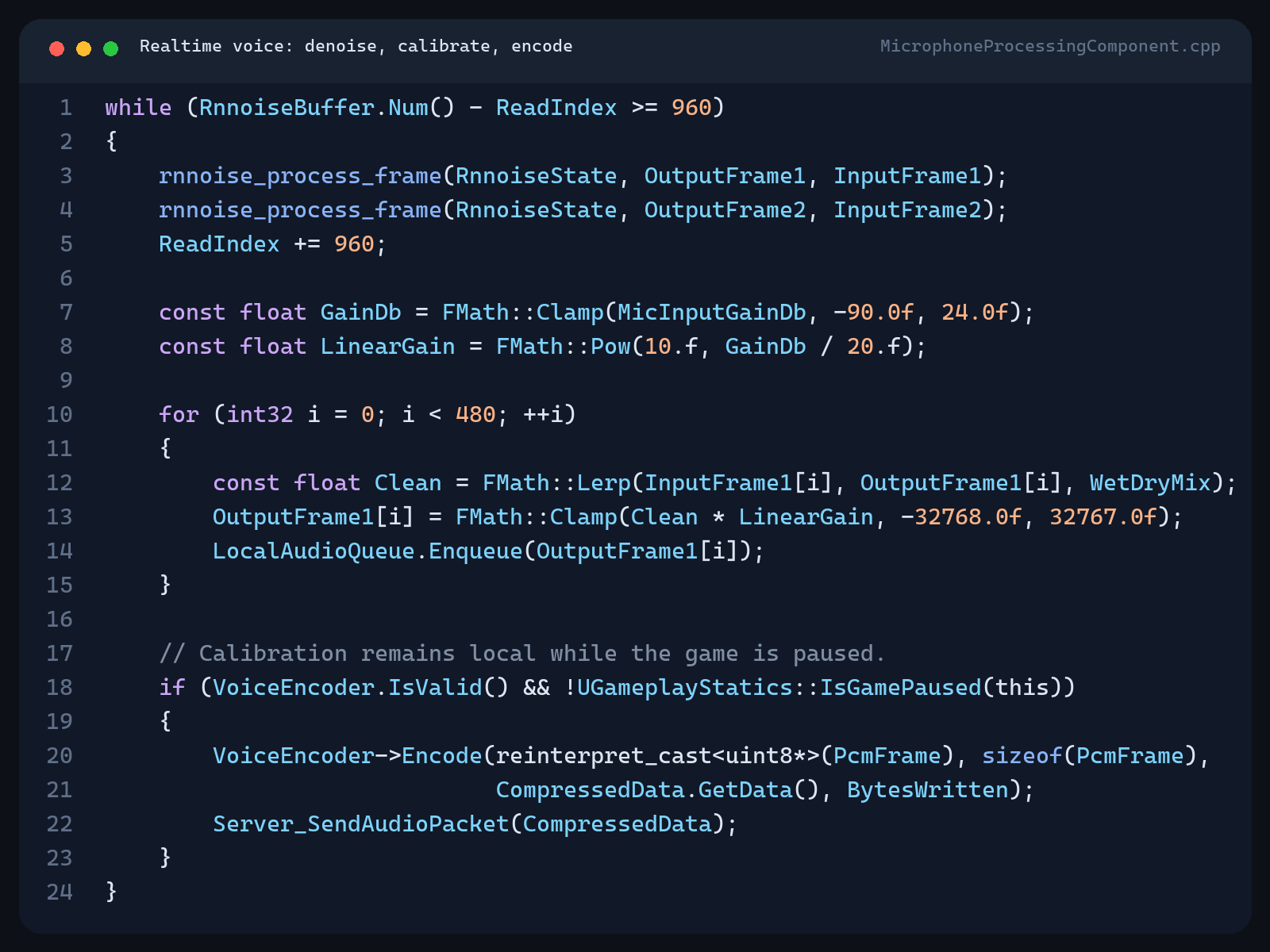
The local client captures 48 kHz mono PCM, accumulates it into RNNoise-compatible frames, and runs realtime denoising before encoding. A wet/dry control keeps the cleanup tunable, while a calibrated input gain is applied before the stream is metered and sent onward.

Compressed voice packets travel through an unreliable server RPC and multicast path, then remote clients decode them into a thread-safe queue consumed by a Wwise Audio Input source. Wwise handles spatial playback and distance behavior, keeping voice chat inside the same acoustic world as the rest of the game. I co-developed the networking portion with Junhang Ma.

C plus plus code showing RNNoise frame processing, microphone input gain, local metering, voice encoding, and network transmission
RNNoise processing, gain calibration, metering, and packet transmission

Microphone Calibration

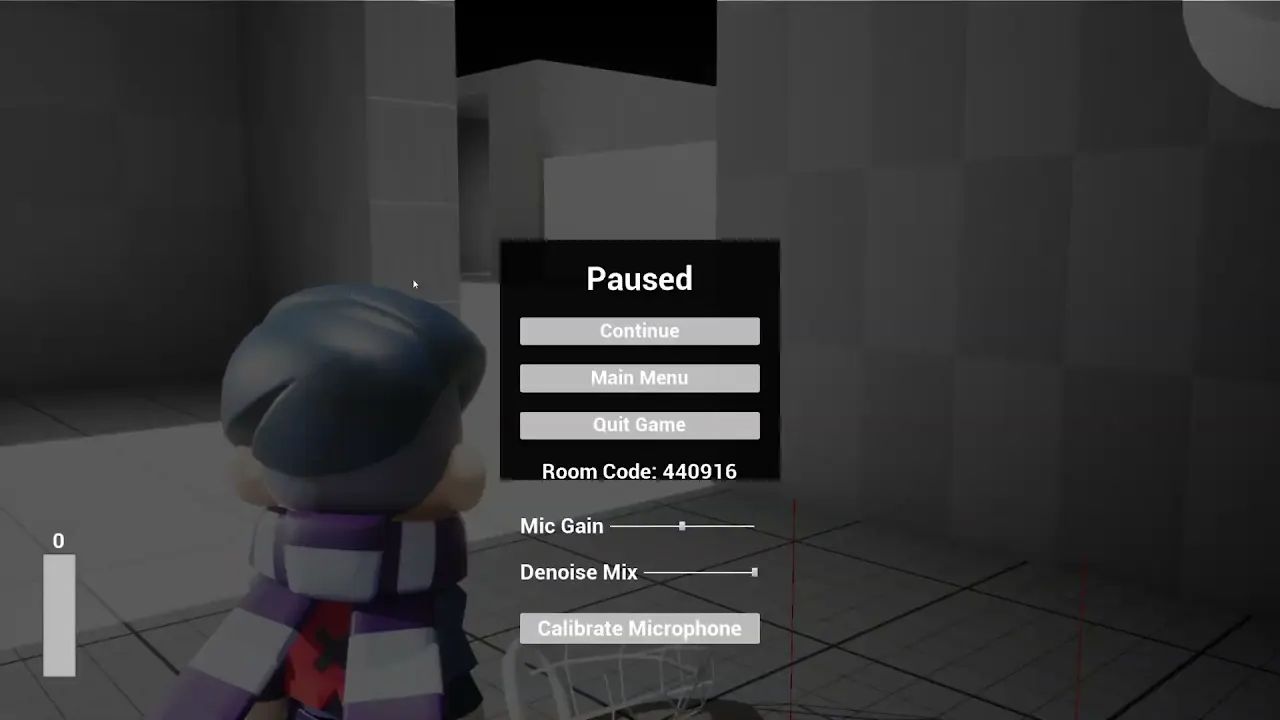
The calibration view reuses the live microphone path instead of simulating a separate meter. Wwise reports the input level through an RTPC, the UI converts it into a readable 0-100 range, and the player can tune denoise mix and microphone gain from -90 dB to +24 dB.

Calibration remains active while gameplay is paused, but packet transmission is explicitly suppressed. This keeps the level meter responsive without broadcasting setup audio to other players.

Dreamcatcher engineer build pause menu with live microphone level, gain, denoise mix, and calibration controls

In-Engine Calibration

The engineer build exposes microphone gain, denoise mix, and calibration directly in the pause menu. The meter remains live while the game is paused, making the complete capture and processing path visible and testable without transmitting setup audio.

In-Engine Development Captures

These work-in-progress recordings were captured directly from the current engineer build. They document active implementation tests rather than final presentation footage.

Player Input Adjustment

A work-in-progress in-engine recording used to evaluate and tune player input behavior inside the current game build.

Room Acoustics Test

A work-in-progress in-engine recording used to evaluate the room acoustics system inside the current game build.

String Telephone

The string telephone turns network voice into a physical game mechanic. When a remote player enters one cup's pickup zone, the microphone component registers the opposite cup as a live sink. Decoded samples feed a dedicated Wwise Audio Input component at the far end, so speech emerges from the correct position in the world.

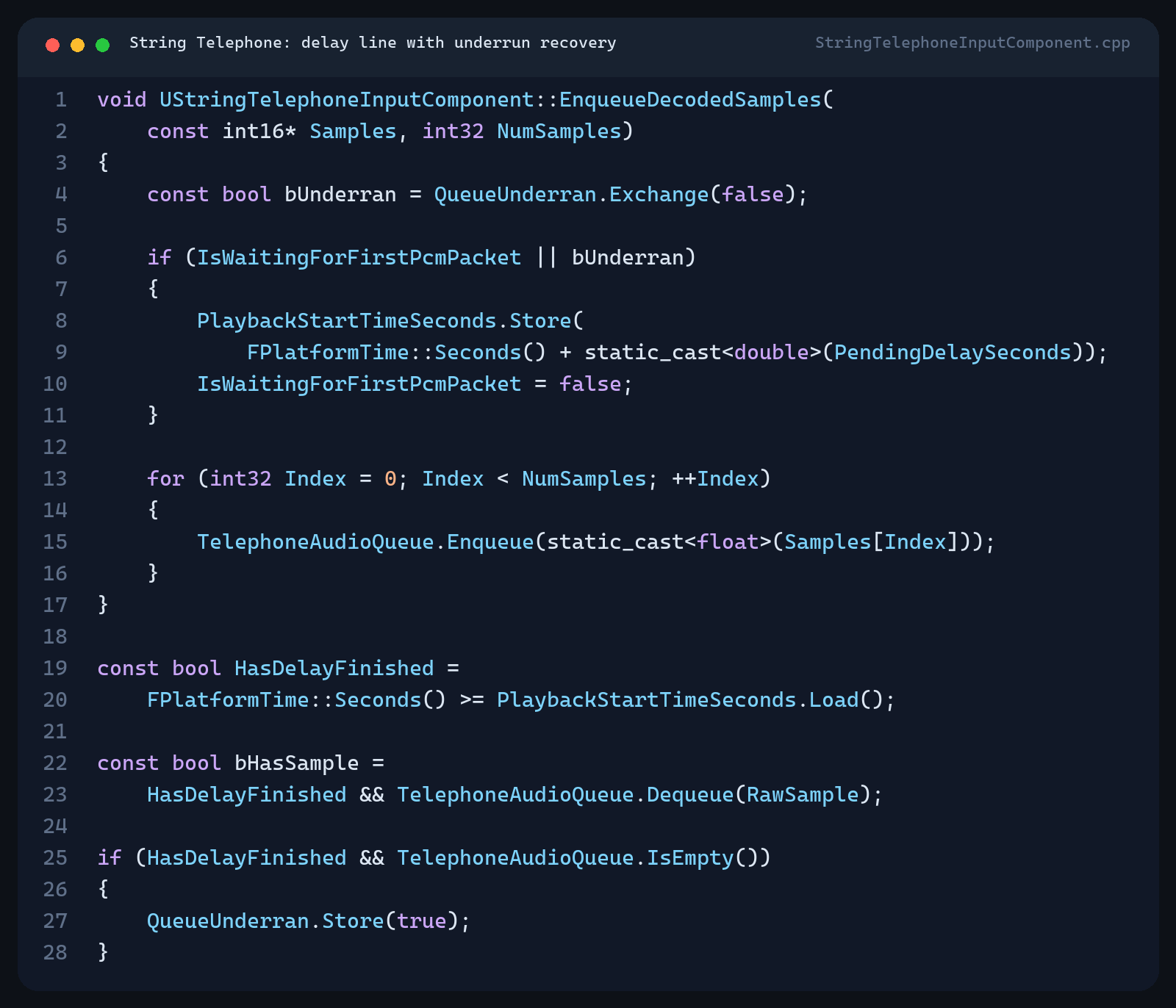
A configurable delay line holds the first packet until enough audio has accumulated. If packet loss or silence drains the queue, an atomic underrun flag re-arms the delay on the next packet instead of letting the intended transmission time collapse. The same delayed loudness history drives the cup glow and gameplay light radius, so the visible response arrives with the voice.

C plus plus code showing the string telephone delay line, queued PCM playback, and underrun recovery
The delay line rebuilds its audio cushion after an underrun

Wwise Production Architecture

The Wwise project separates voice chat, string telephone, player Foley, objects, monsters, UI, and reverbs into dedicated work units and busses. This keeps authoring responsibilities clear while allowing realtime voice to use the same attenuation, routing, RTPC, and spatial-audio systems as authored game content.

The current production set covers ball actions, material-based footsteps, character Foley, monster vocalizations, UI feedback, voice references, ambience, and room-specific acoustic treatment. The list continues to evolve with the game.
Audio Production Ledger

25 named SFX cues
Cue Playback Status
Throw 3D · Mono · One-shot WIP
Catch 3D · Mono · 3 variations WIP
Travel 3D · Mono · Loop WIP
Land 3D · Mono · One-shot WIP

Production scope includes ball interactions, material footsteps, character Foley, monster vocals, UI, ambience, and room acoustics.

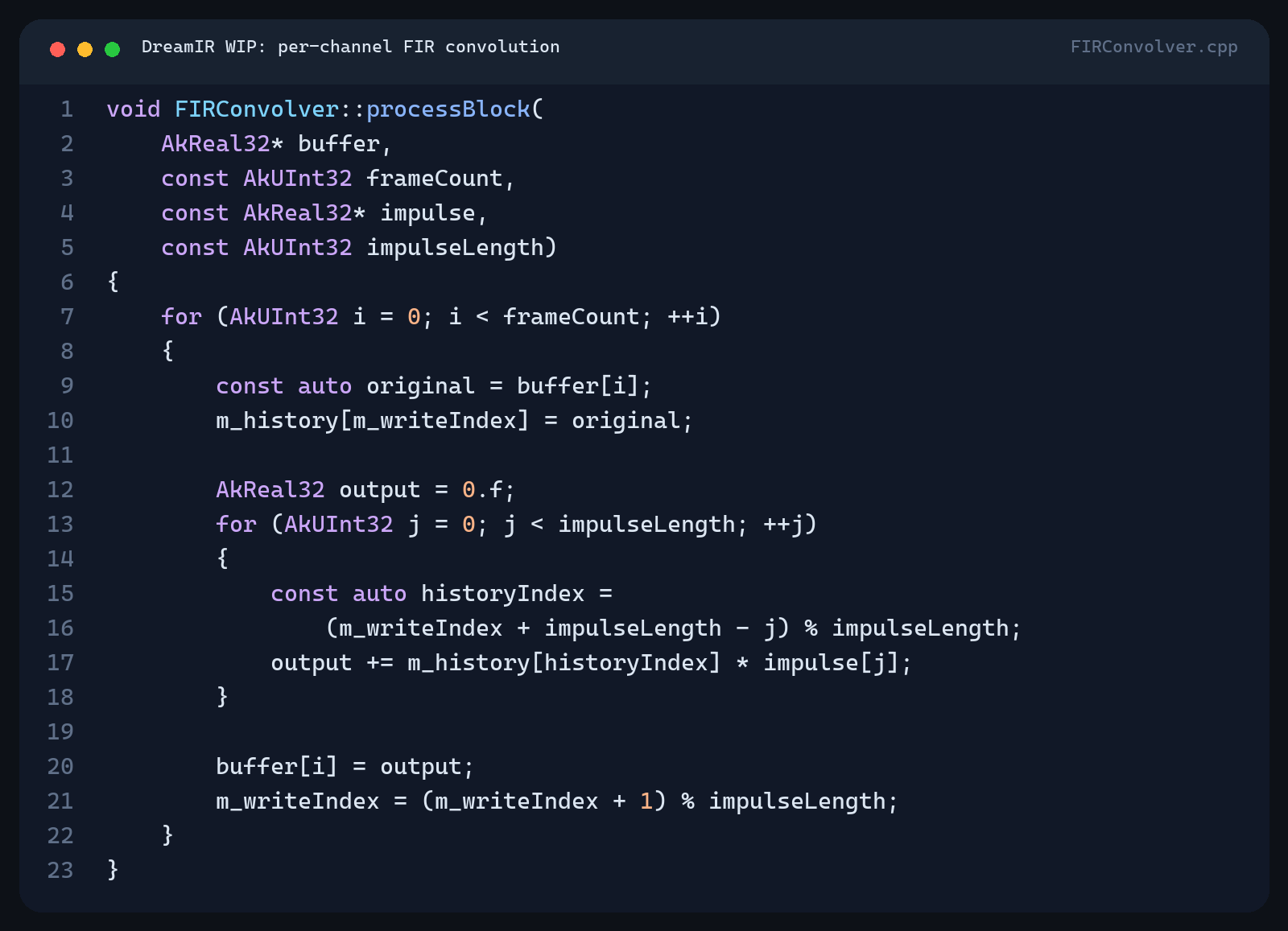
C plus plus code for the DreamIR finite impulse response convolver
DreamIR convolution core

DreamIR - Work in Progress

I am developing DreamIR, a custom Wwise convolution-reverb effect. The current C++ implementation validates and loads impulse-response media, allocates one FIR convolver per channel, and processes audio in place inside the Wwise sound engine.

In parallel, I am researching a geometry-fit workflow that generates a custom impulse response for each room. Both the plug-in and per-room IR generation pipeline remain in active development.